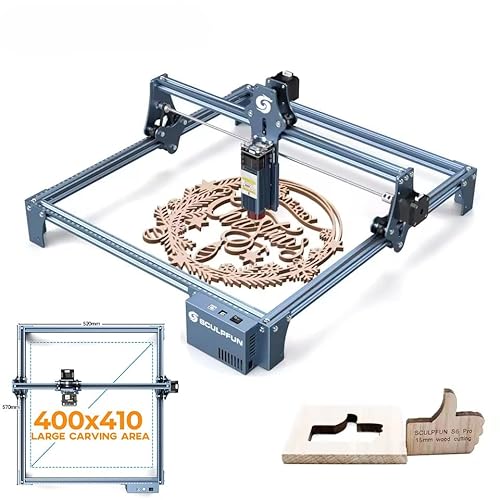
SCULPFUN S9 Pro
6.8Good · out of 10$259 -7% Was- Stated: 10 W laser · 400 × 410 mm
- Laser engravers
Product images: Amazon listings
10 W of stated laser output and a 400 × 410 mm work area: the SCULPFUN S9 Pro covers what matters most in a laser engraver. It makes most sense for filling a craft-fair table with signs and boards; we rate it 6.8/10 from its listing.
| Brand | SCULPFUN |
|---|---|
| Category | Laser engravers |
| Laser output (lowest stated) | 10 W |
| Stated work area | 400 × 410 mm |
| Stated precision | 0.06 mm |
| Software named | LightBurn |
| Cutting claim | Up to 15 mm of wood, per the seller |
| Materials named | Wood, leather, acrylic, metal |
| ASIN | B0GRZBGCYL |
Full listing title: SCULPFUN S9 Pro Laser Engraver, 10000mW Laser Engraving Machine, High Precision Laser Cutter, 0.06mm Laser Spot Engraver Machine for Wood Metal Acrylic Leather, 15.75x16.14" Work Area (10W)
| Laser output (lowest stated) | 10000mWExact listing |
|---|---|
| Stated work area | 400x410mmExact listing |
Rated from the listing's specs, no buyer reviews yet
What it's made for: filling a craft-fair table with signs and boards.

The two laser engravers closest to it on our rating, with a dated price.


The lowest laser wattage the listing states, which is the one we compare. It comes with a 400 × 410 mm work area. How deep it goes on your material is for a settings grid to tell.
What it has going for it
10 W of laser output, per the listing. A solid middle: quick engraving, and thin wood cut in a few passes. We read the lowest laser wattage the listing states, so this is the number to compare.
400 × 410 mm work area. Room for cutting boards, signs and a whole batch of coasters in one go. Our buying guide plans the bench around it.
Cuts up to 15 mm of wood, per the seller. The seller's figure, usually with air assist and sometimes several passes. Treat it as a ceiling and find your own settings on scrap; our settings grid guide shows how.
For a garage or a workshop, an open frame belongs where smoke and stray light bother nobody. A 400 × 410 mm work area wants a big, sturdy bench.
On balance it is happiest in a garage or a workshop, glasses on and the exhaust going outside.
The seller states, word for word, in the SCULPFUN S9 Pro listing:
▶ 10W High-Precision Engraving & Cutting Performance Upgraded 10W laser beam shaping technology delivers an ultra-fine 0.06mm laser focus for extreme precision.
The full-metal structure is engineered for quick assembly, full setup can be completed in 10-20 minutes, no professional experience needed.
Built-in precise X/Y axis scale lines, with a 400x410mm large engraving area, meets diverse DIY and commercial creation needs.
These are the seller's own words and figures.

What the SCULPFUN S9 Pro listing names:
Plan the bench, the exhaust route and the glasses before the box arrives.

At the price on Nov 18, 2026, each stated watt of laser output costs about $26. That puts it in the cheaper third of the 51 laser engravers we have a price for.
Only a rough yardstick: the work area, the enclosure, the size and what comes in the box count as much.
The button opens the exact listing (ASIN B0GRZBGCYL), where today's price, stock and seller apply.

Want the beam under a cover? The xTool F2 Dual Laser (7.7/10) is enclosed, per its listing.
Want to cut thicker stock? The xTool S1 40W Rotary Bundle (9.2/10) states 40 W of laser output.
Want air assist built in? The Twotrees TTS-55 Pro (9.1/10) lists air assist.
Our take
On the SCULPFUN S9 Pro, 10 W of stated laser output is what caught our eye, and a 400 × 410 mm work area doesn't hurt either. No buyer reviews yet, so this SCULPFUN laser engraver has to win you over on paper. Honestly, the catch: the listing says nothing about air assist, and at 10 W you'll want it for clean cuts in wood, so budget for a kit. We'd pick it if you make signs and cutting boards, not just keychains; otherwise, put it next to the ATOMSTACK A10 PRO V2 10W first.
The listing mentions assembly, so set aside an evening, square the frame and keep the screws sorted.
Run a settings grid on scrap wood before the first real gift. LightBurn is named in the listing, so the usual grid tools are one menu away. Our settings grid guide has the routine.
Glasses on, extraction running, and a quick wipe of the lens every few jobs. Our focus and alignment guide has the rest.
400 × 410 mm fits a row of coasters or a full sign in one go, which is where a bigger bed earns its keep.
Before you add the SCULPFUN S9 Pro to your cart: check the work area, because 400 × 410 mm has to fit the biggest piece you plan to make, with room for clamps or a rotary.
Cut a piece of cardboard to 400 × 410 mm, put your biggest project on it, and see what sticks out. Our buying guide has the layout.
An open frame lets the smoke into the room, so plan a route to a window or a filter unit before the first job. Our ventilation and materials guide covers what to check.
An open beam needs safety glasses for its exact wavelength, a fire-safe surface and someone in the room. Our safety and enclosures guide explains enclosures.
The listing names LightBurn. Check which software the maker supports on your computer before the box arrives, and plan an evening for the first settings grid. Our software workflow guide walks through a job.
How the SCULPFUN S9 Pro stacks up against the closest alternative, the ATOMSTACK A10 PRO V2 10W.
| Criterion | SCULPFUN S9 Pro | ATOMSTACK A10 PRO V2 10W |
|---|---|---|
| Our rating | 6.8/10 | 6.8/10 |
| Laser output | 10 W stated | 10 W stated |
| Work area | 400 × 410 mm | 410 × 380 mm |
| Air assist | Not stated | Stated |
Both score 6.8/10. The SCULPFUN S9 Pro brings a bigger work area (400 × 410 mm), so it has the edge on paper.
We rate it 6.8/10 (good). The rating comes from its documented listing alone, as no customer-review record is captured yet.
Its listing states 10 W as its lowest stated laser wattage and a 400 × 410 mm work area. Those are the seller's figures, and a big wattage in a title often describes the power supply or the module rather than the light that reaches your material.
Check the exact listing and the manual for what ships in the box: safety glasses for its wavelength, smoke extraction or a filter unit, a work surface such as a honeycomb bed, and the software. Never laser PVC, vinyl or unknown plastics, and never leave the machine running on its own. Our laser buying checklist lists the checks.
Its listing states 10 W of stated laser output and a 400 × 410 mm work area. These are the seller's figures; how fine the detail comes out on your material and how loud the fans are in your room can't be read from a listing.
What you will make: cut a piece of cardboard to 400 × 410 mm, put your biggest project on it, and see what sticks out. Our buying guide has the layout. Smoke and air: an open frame lets the smoke into the room, so plan a route to a window or a filter unit before the first job. Our ventilation and materials guide covers what to check. Eyes and fire: an open beam needs safety glasses for its exact wavelength, a fire-safe surface and someone in the room. Our safety and enclosures guide explains enclosures. Software: the listing names LightBurn. Check which software the maker supports on your computer before the box arrives, and plan an evening for the first settings grid. Our software workflow guide walks through a job.
We link to the exact listing on Amazon, where today's price, stock and seller apply. It is an affiliate link, and it has no effect on the rating.
If the SCULPFUN S9 Pro hasn't sold you yet, see where it ranks, read the guides that feature it or browse all laser engravers.